
Bloom
Stereo shimmer reverb
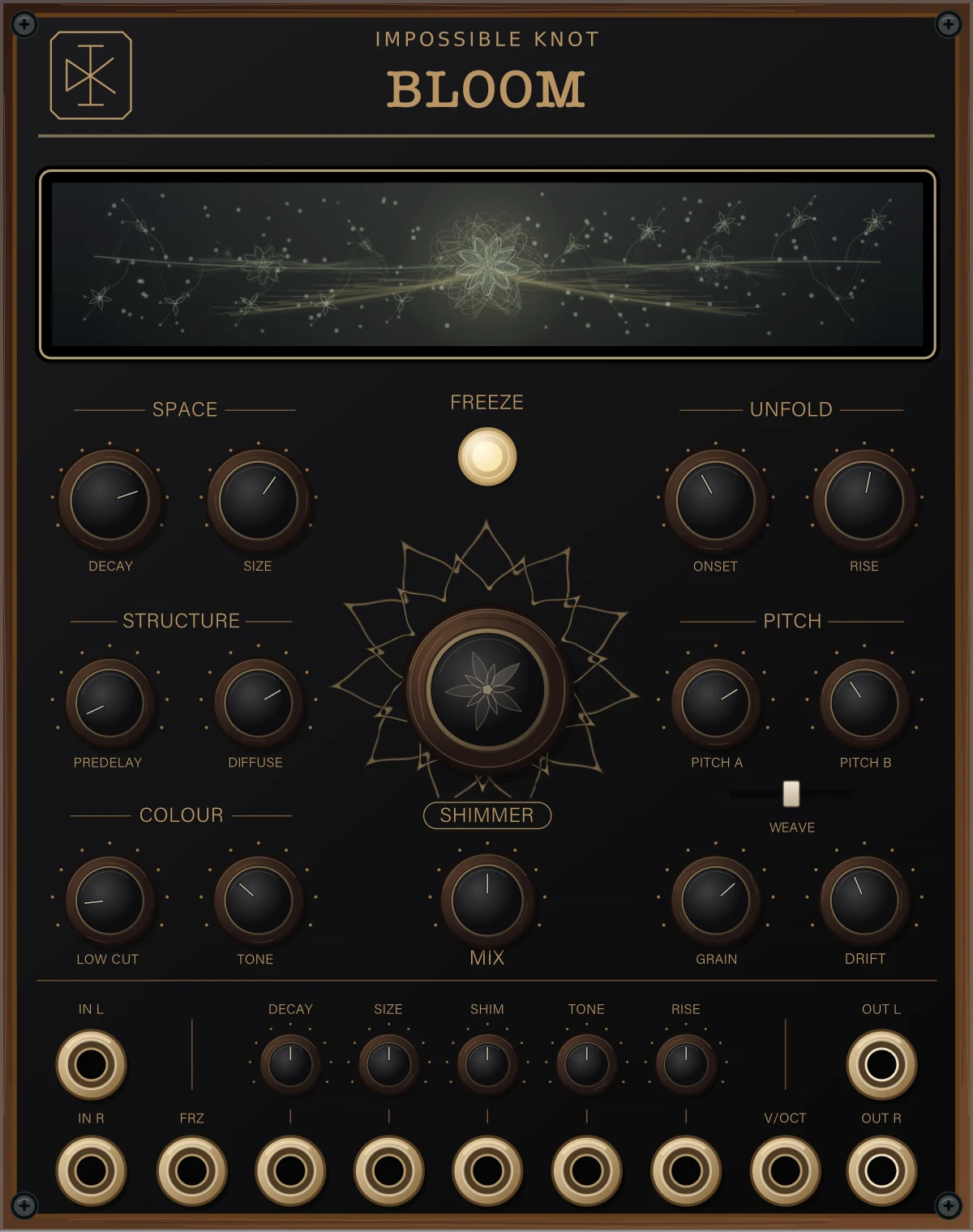
Bloom feeds two pitch-shifted voices back into a stereo reverb. ONSET controls when they arrive and RISE controls how gradually they come in. With SHIMMER at zero, it’s just a reverb.
VCV Rack 2 · 20 HP · Free
Quick start
Patch your sound into IN L (both inputs for stereo), then OUT L/R to your mixer. Play a chord and let it ring. Turn SHIMMER down to hear just the reverb, then bring it back up. Use MIX for the dry/wet balance; set it fully wet on an effects send.
Controls
- DECAY / SIZE
- Tail length and reverb size. Moving SIZE bends the pitch of a ringing tail.
- PREDELAY / DIFFUSE
- PREDELAY adds up to 500 ms before the reverb. DIFFUSE spreads out the attack: higher is smoother.
- LOW CUT / TONE
- Remove low frequencies and damp the high end inside the reverb.
- SHIMMER
- How much pitch-shifted sound feeds back. Zero gives you plain reverb.
- ONSET / RISE
- ONSET waits before adding shimmer; RISE brings it up gradually. ONSET follows SIZE, rather than a fixed time. RISE goes up to eight seconds—give it enough DECAY to be heard. A gap of roughly a second between phrases lets the swell restart.
- PITCH A / B
- Two shift intervals, each ±24 semitones. WEAVE balances them: left is A, right is B.
- GRAIN / DRIFT
- GRAIN sets the pitch-shifter window: shorter is rougher, longer is smoother. DRIFT adds slow, irregular movement.
- MIX / FREEZE
- MIX blends dry and wet. FREEZE holds the tail; press again to release it. By default, new input and pitch shifting stop while frozen.
Patching & options
The little knobs above DECAY, SIZE, SHIM, TONE and RISE set CV amount. Centre is zero; right adds, left inverts. RISE needs to be above zero before its CV can do anything.
V/OCT shifts PITCH A only, at 1 V/octave within its ±24-semitone range. FRZ holds freeze while a gate is high. If the button is latched on too, press it to unfreeze.
Right-click for semitone snapping, input level while frozen, pitch-lock during freeze, and grain-window randomisation.
The display
The pattern follows the controls and audio. As the sound fades, the branches disappear and the centre flower keeps slowly turning. It isn’t a level meter.
Installation
Bloom is free on the VCV Library, as part of the Impossible Knot plugin. Sign in to your VCV account and click Add on its Library page.
In Rack, sign in to the same account through the Library menu, choose Update all, and restart when the download finishes. Right-click an empty space in your rack and search for Bloom. Use Rack 2.4 or later.
Already have a .vcvplugin file?
In Rack, choose Help → Open user folder, then close Rack. Put the file in the plugins folder matching your Rack build: plugins-mac-arm64, plugins-mac-x64, plugins-win-x64 or plugins-lin-x64. Don’t unzip it. Restart Rack and search for Bloom.
Use Rack 2.4 or later. See Rack’s installation notes if you get stuck.
Bloom 2.0.2 · Closed-source freeware. Free to use in your music, including commercial releases. Questions? hello@impossible-knot.com