
Faultline
Stereo glitch instrument
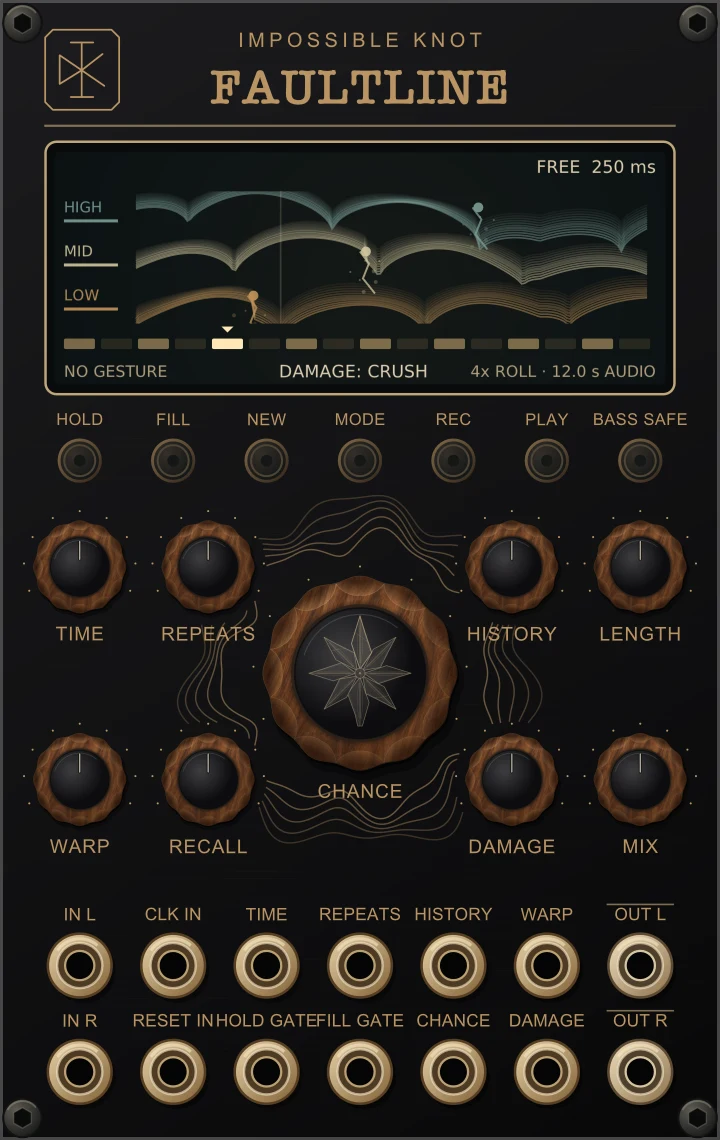
Catch a fragment, repeat it, reach back through its history, then shift, reverse or damage it. Chance and Recall turn those decisions into a pattern; record your movements and play them back as a gesture.
VCV Rack 2 · 16 HP · Free
Quick start
- Patch sound into IN L, or both inputs for stereo, and connect OUT L/R to your mixer. Let the history fill for a moment.
- Start with low Damage and a modest Mix. Raise the large Chance knob, then try Repeats and Warp.
- Shorten the pattern with Length. Turn Recall up for a recurring pattern, then press New to choose another.
- Try Hold to catch a phrase, Fill for a burst of activity, and Mode to change the Damage processor.
The four Faultline factory presets offer starting points: First Faults, Broken Glass, Locked Ratchets and Vinyl Drift.
Nine knobs
- TIME
- Clockwise shortens the playback window. Without a running clock: 4 seconds to 20 ms. With clock: 25 straight, dotted (D) and triplet (T) note values, from four whole notes to a 1/64 triplet. The screen and tooltip show the current duration or division.
- REPEATS
- Retrigger the selected window 1, 2, 4, 8 or 16 times. Very short startup history can limit the available repetitions.
- HISTORY
- Choose older audio from the available 30-second rolling memory. The window stays behind the recording head.
- LENGTH
- Set the pattern cycle to 1–16 steps. Changing Length restarts at step one. Length stays live during gesture playback.
- WARP
- Increase the range of seeded octave shifts, up to two octaves each way, and the probability of reverse playback. Pitch changes keep the repeat grid intact.
- CHANCE
- The large central control sets how many steps are candidates for glitches. Zero gives ordinary live playback; Damage can still colour it. FILL overrides the density.
- RECALL
- At maximum, the same seeded decisions recur over the selected pattern length. Turn it down to let them evolve from one cycle to the next. New incoming audio can still change what you hear.
- DAMAGE
- Set the amount of the selected processor. MODE cycles through Crush, Gaps, Drive, Filter and Vinyl; the screen identifies the current choice. Zero smoothly removes the damage contribution.
- MIX
- Blend dry and wet linearly. Mix stays live during gesture replay. Both paths pass through the same sample-rate converters, which add latency even at zero Mix; Rack bypass passes live input immediately.
Damage modes
MODE selects the processor; DAMAGE controls its amount. The screen footer shows the active choice. At zero Damage, each processor’s contribution is smoothly removed.
- CRUSH
- Stepped digital degradation through quantisation and sample holding. The control moves through changing ranges of the two processes.
- GAPS
- Randomly switches between the signal and silence. More Damage increases the probability of switching.
- DRIVE
- Adds nonlinear drive and clipping with level compensation. Higher settings push into harder distortion.
- FILTER
- Sweeps a low-pass and high-pass filter contour for tonal cuts, with soft saturation at the output.
- VINYL
- Clicks, crackle and hiss with changes in tone and level. This mode can add noise even when the input is quiet.
Buttons & gestures
- HOLD
- Latch the recorded audio; press again to release. The HOLD gate also holds while high, so release the button latch for gate-only control. Playback continues through held material.
- FILL
- Hold to glitch every following window and double its repetitions, capped at 16. A short trigger queues a fill at the next window.
- NEW
- Choose a new seed, rank a new step mask and restart at step one. The button flashes briefly and the screen confirms NEW. Audio history is kept. With no effective Warp/Damage, one repeat, or an all-on/all-off pattern, the change may be subtle or inaudible.
- MODE
- Cycle Crush → Gaps → Drive → Filter → Vinyl. Choose a mode directly from the button or module context menu. The screen shows DAMAGE followed by the mode name.
- REC / PLAY
- REC starts capturing control movement immediately; press again to stop in READY. PLAY loops the stored gesture, or stops replay. Pressing PLAY while recording commits and starts replay. An empty gesture does not play.
- BASS SAFE
- Keep more of the native low band while reducing low-frequency effect differences with a gentle 220 Hz complementary filter. Switch it off for full-band damage. It is not a brick-wall bass bypass.
Record a gesture
Press REC, move the controls, then press REC again to keep the take or PLAY to loop it immediately. The screen says NO GESTURE, RECORDING, GESTURE READY or REPLAYING and shows progress.
Gestures capture effective primary knob values after CV, plus Hold and Fill, at 200 Hz. Mix and Length stay live. Damage mode, Bass Safe and the seed remain live preferences. A completed gesture lasts between 50 ms and about 10.24 seconds. Very short gates can affect the audio but fall between samples; use pulses of at least 5 ms when they must be recorded.
Clear the gesture from the context menu. The screen contains no buttons or hidden Shift controls.
Clock & timing
Patch a clock into CLK IN. One pulse is one quarter note. For example, 1/8 is half a pulse interval, 1/8 D is three quarters, and 1/8 T is one third. Clock measurement needs two rising edges; Time stays free until the interval is known. The first interval can be up to ten seconds.
A plugged-in cable with no measured clock stays in free time. After acquisition, a stopped clock returns to free time after the greater of one second or 2.5 measured pulse intervals. Unplugging switches to free time immediately.
Changing division realigns immediately. Tempo changes greater than two percent realign on the detecting pulse; free-time changes take effect at a playback boundary. A very long clocked window is capped at 15 seconds of the 30-second memory; an ! on the screen marks the limit.
Patching
IN L normalises to IN R. Each audio jack carries one channel; the pairs provide stereo audio.
Six CV inputs modulate Time, Repeats, History, Warp, Chance and Damage. ±5 V spans the normalised control range; use an external attenuator for smaller changes. Warp CV changes the Warp amount, rather than providing direct 1 V/octave pitch control.
HOLD is a gate input; FILL accepts held gates or short triggers. Gates rise at 1 V and fall at 0.1 V. RESET realigns the pattern and gesture replay without clearing the audio history. OUT L/R carry the final stereo output after Mix.
Read the terrain
The LOW, MID and HIGH layers trace roughly the latest second of recorded source-energy history. They are expressive curves, not a calibrated waveform or spectrum. Actual output energy sets their brightness; quiet audio becomes quiet terrain. Fissures and bright dots follow real playback positions, shifts and active faults.
The sixteen-cell strip shows candidate steps and the current position. Cells beyond Length are dim. The top row shows the free duration or clock division, plus brief NEW and active HOLD/FILL feedback. The footer names the Damage mode and reports the available rolling audio. Hold stops source-history updates while the playback cursor keeps moving.
The browser and Library use a fixed terrain preview. In your rack, the display follows the audio and instrument state.
Saving & reset
Knob settings, seed, pattern state and a completed gesture save with the patch. Restoring a patch leaves gesture playback stopped. The recorded audio and rolling history are volatile and are not saved.
A sample-rate change clears audio and terrain, keeps the completed gesture and stops replay. Feed audio before replaying a gesture that contains Hold.
Installation
Faultline is free on the VCV Library, alongside Bloom and Tangle in the Impossible Knot plugin.
Sign in on the Faultline Library page and click Add. In Rack, sign in to the same account through Library, choose Update all, and restart after downloading. Search for Faultline in the module browser. Use Rack 2.4 or later.
Already have a .vcvplugin file?
Choose Help → Open user folder, then close Rack. Put the package in the folder matching your Rack build: plugins-mac-arm64, plugins-mac-x64, plugins-win-x64 or plugins-lin-x64. Keep the package compressed. Restart Rack and search for Faultline.
Impossible Knot 2.1.0 guide · Closed-source freeware. Free to use in your music, including commercial releases. Questions? hello@impossible-knot.com